
How to Prioritize Workplace Tickets: A Practical Framework



Every time a new facilities ticket comes in, your team has to decide what to do with it: fix it now, schedule it for later, or route it to someone else. This step is called triage, and when it’s done well, tickets get sorted quickly and the right work gets done first.
But without clear priorities, every ticket feels equally urgent. Many teams default to just handling tickets in the order they come in. If your team always feels like it’s putting out fires, that’s a common sign that you need a better approach to prioritizing.
This guide shows you how to build that system, from the factors that matter most to a priority chart your team can start using today.
Why first-come, first-served fails for facilities tickets
Handling tickets in the order they arrive seems fair, but that order only tells you who spoke up first.
To see how much trouble a problem actually causes, you’ve got to look past the broken item itself and instead look at who the situation will impact.
This is also why you can’t judge a ticket by just how serious the problem looks. For example, think about a broken display screen in a small meeting room that nobody has booked for the rest of the week. Now picture a batch of dead wireless keyboards in the hot-desk area on your busiest office day. The broken screen sounds like the bigger problem in theory, but in reality, the keyboards are doing more damage, because they affect more people right now.
The lesson is simple: the right order to solve your tickets shouldn’t be based solely on when a ticket arrived or how bad it sounds. It should also factor in who it affects and how soon. The next section breaks that down into four factors you can use to rank any ticket.
What factors should determine a facility ticket's priority?
There are four factors to check for every ticket: impact, urgency, space, and safety. Each one comes with a simple question. Once you’ve answered all four, it’s usually clear where the ticket belongs in line.
- Impact: Impact is the number of people and upcoming bookings the problem will touch. A broken monitor at a desk nobody uses might bother one person, while a camera in a meeting room that’s booked all week could affect dozens. The more people affected, the higher the ticket should go.
- Urgency. Urgency is about timing. Check when the space is booked next. If a projector breaks in a room that’s free until tomorrow afternoon, you have time to fix it. If it breaks 20 minutes before an all-hands meeting, you don’t. The sooner someone will hit the problem, the faster it needs attention.
- Space. Some spaces matter more than others. A problem in the executive boardroom or a room where you meet clients is a bigger deal than the same problem at a regular hot desk. When things go wrong in those rooms, more is at stake. Decide ahead of time which spaces count as high priority.
- Safety and compliance. Safety comes before everything else. A water leak near electrical outlets, a blocked fire exit, or a broken accessibility feature goes straight to the top. The same goes for anything that could put your company out of line with building codes or legal requirements.
Now, answering these four questions for every ticket can feel like a lot at first. The next section turns them into a simple priority chart, so your team can sort tickets quickly without having to think it through every time.
A simple facilities ticket priority matrix
A priority matrix turns those four factors into a shared language, so everyone on your team ranks tickets the same way. Here's an example matrix as a starting point.
To use the chart, run a new ticket through the four questions. Start with safety. If someone could get hurt, it’s a P1, no matter what else is true. If not, look at how many people it affects, how soon they’ll run into it, and how important the room is. Then pick the level that fits best.
The response times in the chart are just examples. Every team is different, so set your own response expectations based on your team’s size and service expectations. Then write them down and share them, so everyone on your workplace team is working from the same rules.
Keep in mind, the above chart works best when you have a clear picture of how many people a problem actually affects. This next section shows you how to figure that out.
How do you measure the impact of a facilities issue?
In order to calculate the impact of a facilities issue, you need to check who’s planning to use that space. Here’s how to do that by hand:
- Find out where the problem is. Note the exact room, desk, or area.
- Look at the booking calendar for that space. See who has it reserved today, tomorrow, and for the rest of the week.
- Count the people. Add up how many meetings and people are booked there.
That number is the problem’s impact. The bigger the number, the higher the ticket should go.
For example, say someone reports that the TVs in Conference Room B and C won’t turn on. When you check the calendar, you see that Conference Room B has six meetings booked there tomorrow, with about 40 people in total. Meanwhile, Conference Room C has only one meeting tomorrow booked for 3 people. Now you know to service Conference Room B before starting on C.
Impact is the easiest factor to skip because checking bookings often takes teams extra steps.When that happens though, small problems in busy rooms slip through and end up affecting lots of people.
Once you know how many people a problem affects, it also helps to know which rooms need extra care. That’s what we’ll cover next.
How should you handle high-priority rooms?
Not every room in your office is equally important. A problem in the room where your leadership team meets or where you host clients is a much bigger deal than the same problem at a regular desk. These are your high-priority rooms, and they need their own set of rules.
How to pick your high-priority rooms
Start by asking which rooms would cause the most trouble if something went wrong. For most offices that includes:
- The executive boardroom, where leaders hold important meetings.
- Rooms where you meet clients or visitors, because problems there affect how external people see your company.
- Large rooms, like training rooms or event spaces, where one problem can affect dozens of people at once.
How to set rules for your high-priority rooms
Once you know which rooms matter most, decide how problems in those rooms should be handled:
- Decide how fast to respond. A problem in the boardroom might need attention within the hour, even if the same problem elsewhere could wait a day.
- Decide who needs to know. For example, you might always alert the executive assistant when something breaks in the boardroom.
- Decide who makes the call on moving meetings. For some rooms, a person should always approve before anyone’s meeting gets moved to another space. That way, nothing important gets shuffled around without someone checking first.
Write the rules down before you need them
The best time to set rules for high priority rooms is when nothing is broken. Agree on the rules while things are calm, write them down, and share them with your team. Then, when something goes wrong, everyone already knows what to do.
High-priority rooms get extra care, but what about everything else? Next, let’s look at how to keep smaller tickets from piling up.
How do you keep low-priority tickets from piling up?
Low priority doesn't mean no priority. Left alone, P4 tickets can pile up, frustrate the people who reported them, and occasionally turn into bigger problems.
Follow these three habits keep them moving:
- Batch similar issues by location. Group low-priority tickets by floor or building, so one technician visiting can clear several tickets at once.
- Look for clusters and patterns. A map or location view of open issues shows when three "minor" problems on the same floor point to one bigger cause.
- Review the queue on a regular cadence. A weekly review lets you reassess aging tickets. A P4 from three weeks ago may be a P2 now if the space got busier.
Should you automate ticket prioritization?
Once you start prioritizing tickets, you’ll notice that some steps are the same every time. Automating can save your team from having to do them by hand. The trick is knowing which steps to hand off and which ones to keep.
What to automate
Some tasks don’t take real decision-making and are easy to automate, including:
- Filling in ticket details for submitters, like which desk or room has the problem and who reported it.
- Checking the booking calendar to see who else is affected.
- Finding a replacement desk or meeting space for the people who need one.
These tasks eat up your day, and they’re the first to slip when things get busy. That makes them great areas to automate.
What to keep
Other decisions need a person who knows your office and the people in it. For example:
- Whether to close a room before a big event.
- How to handle problems in your most important rooms, like the executive boardroom.
- Whether a problem is a safety risk that needs attention right away.
How Robin helps you prioritize facilities tickets
The hardest part of prioritizing is knowing who a problem affects. Now Robin pulls that for you automatically and can even find team members a backup resource or space to use. Here’s what that looks like, from the moment someone reports an issue.
Reporting takes one photo
Say an employee sits down and finds their monitor cracked. They can just open the Robin Agent on their phone and snap a photo. Based on the image, Robin’s AI Agent will fill out a ticket on their behalf describing the issue. The employee checks the details, approves them, then the report is sent, photo included.

Every ticket is in one place, ready to sort
Every issue lands in Robin, where admins can set a ticket’s priority and status right from the list without opening it. AI can suggest a priority to speed things up, but admins can confirm or override it with a click, so your team always has the final say. Filter to your critical issues, and the problems that matter most stay at the top.

See who’s affected and get them somewhere that works
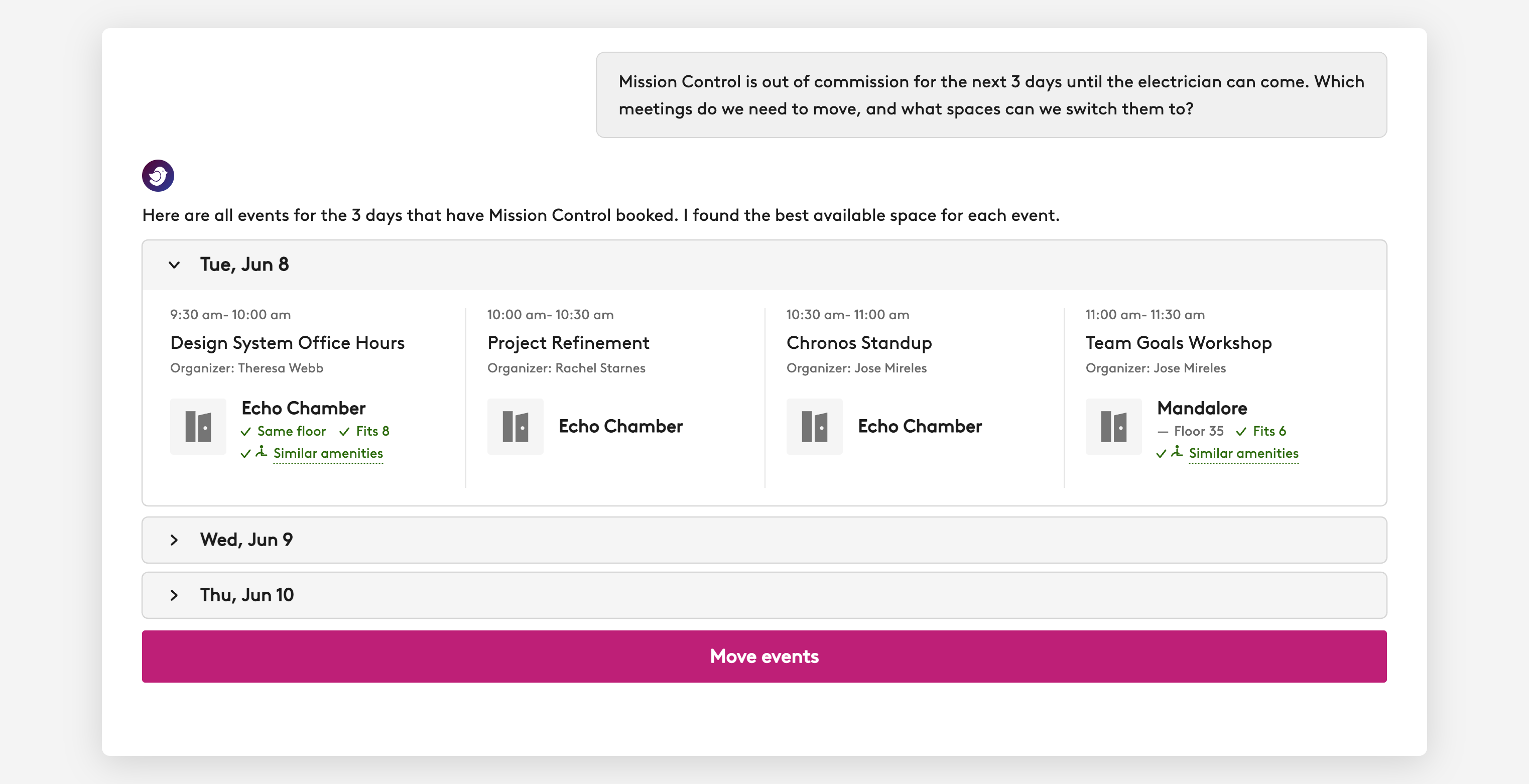
From any ticket, you can ask the Robin Agent who else the problem affects. It checks every booking on that desk or room over the next couple of days and tells you who will be impacted and even recommends other available resources or spaces for them to use during their booking time.
See problems on the map
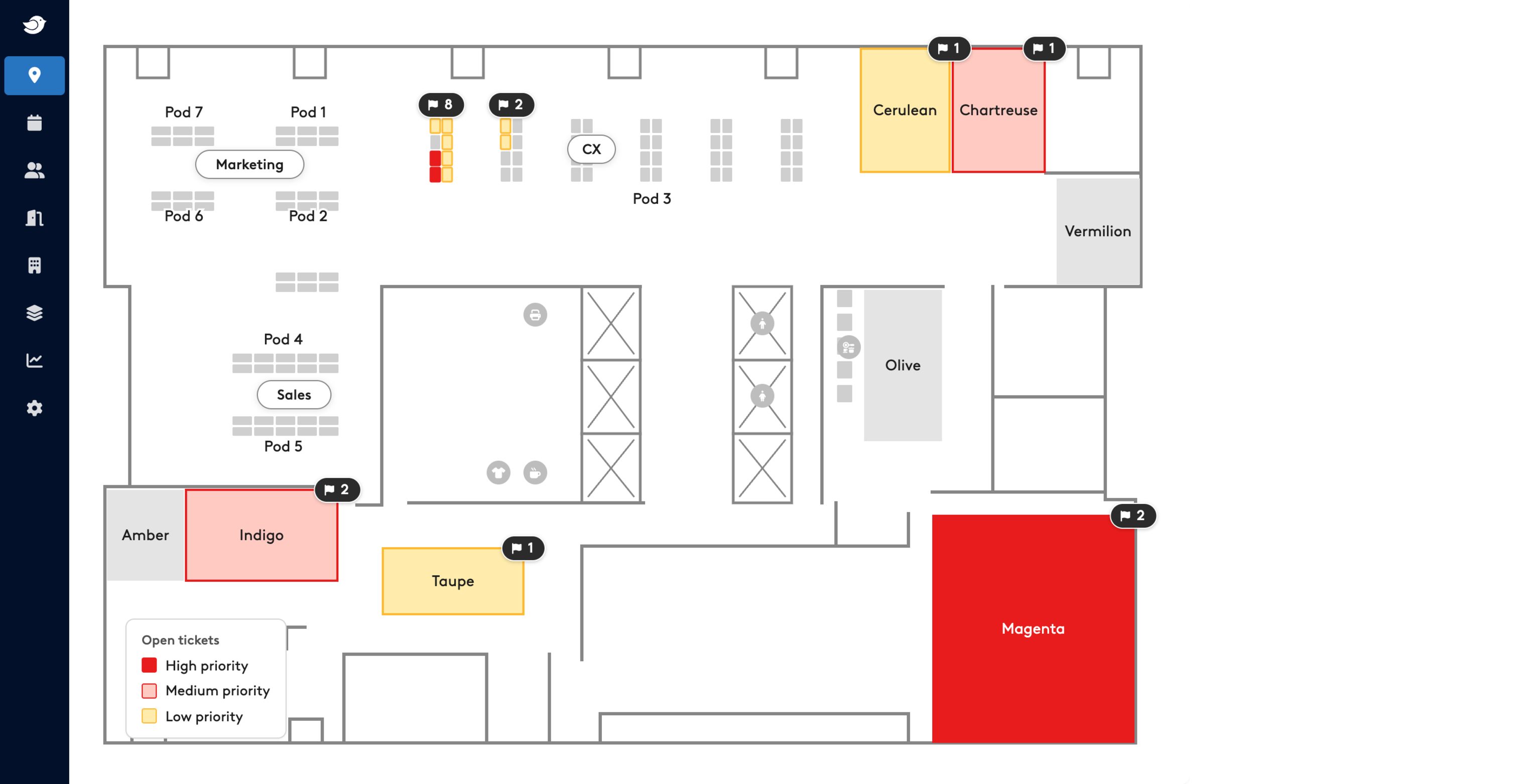
Robin’s maps can also show reported issues by office and floor. This gives you another view to spot problem areas, like a floor with several issues at once.
Prioritize your workplace tickets with ease
Handling tickets in the order they arrive might feel fair, but it doesn’t actually tell your team what to fix first. A better way is to ask four simple questions about every ticket:
- Could someone get hurt?
- How many people will this affect?
- How soon will someone run into it?
- How important is this room?
Once your team uses the same questions, every new ticket gets easier to sort. Big problems get handled before they spread, and small ones wait their turn without anyone worrying.
You don’t have to set it all up at once. Start small:
- Pick your high-priority rooms.
- Agree on how fast to respond at each priority level.
- Get in the habit of checking bookings to see who’s affected.
Ready to put this into practice? See how Robin’s Workplace Services help you prioritize what matters.
Frequently asked questions
What is the best way to prioritize facilities requests?
Rank each request on four factors: impact (how many bookings and people it affects), urgency (how soon the next booking starts), how important the space is, and safety. Safety issues should always go first. Among the rest, the highest impact and the soonest booking should follow.
What counts as an urgent facilities ticket?
A ticket is urgent when it poses a safety or compliance risk, or when it affects a booking that starts soon, especially in a critical space like a boardroom or client-facing room.
How do you set response times for facilities tickets?
Start with a priority matrix, then set a response window for each level based on your team's size, your vendors, and how your spaces are used.
Should conference room issues be prioritized over desk issues?
Often, but not always. Conference rooms usually affect more people per booking, so their issues tend to have a higher impact.
How do you prioritize facilities tickets when your team is small?
Focus on impact. Handle safety issues first, then the issues affecting the most people soonest. Batch low-priority tickets by location, and automate the repetitive steps, like finding affected bookings and warning organizers, so your limited time goes to the fixes.