

9 Ways Facilities Managers Can Use AI to Run a Better Office
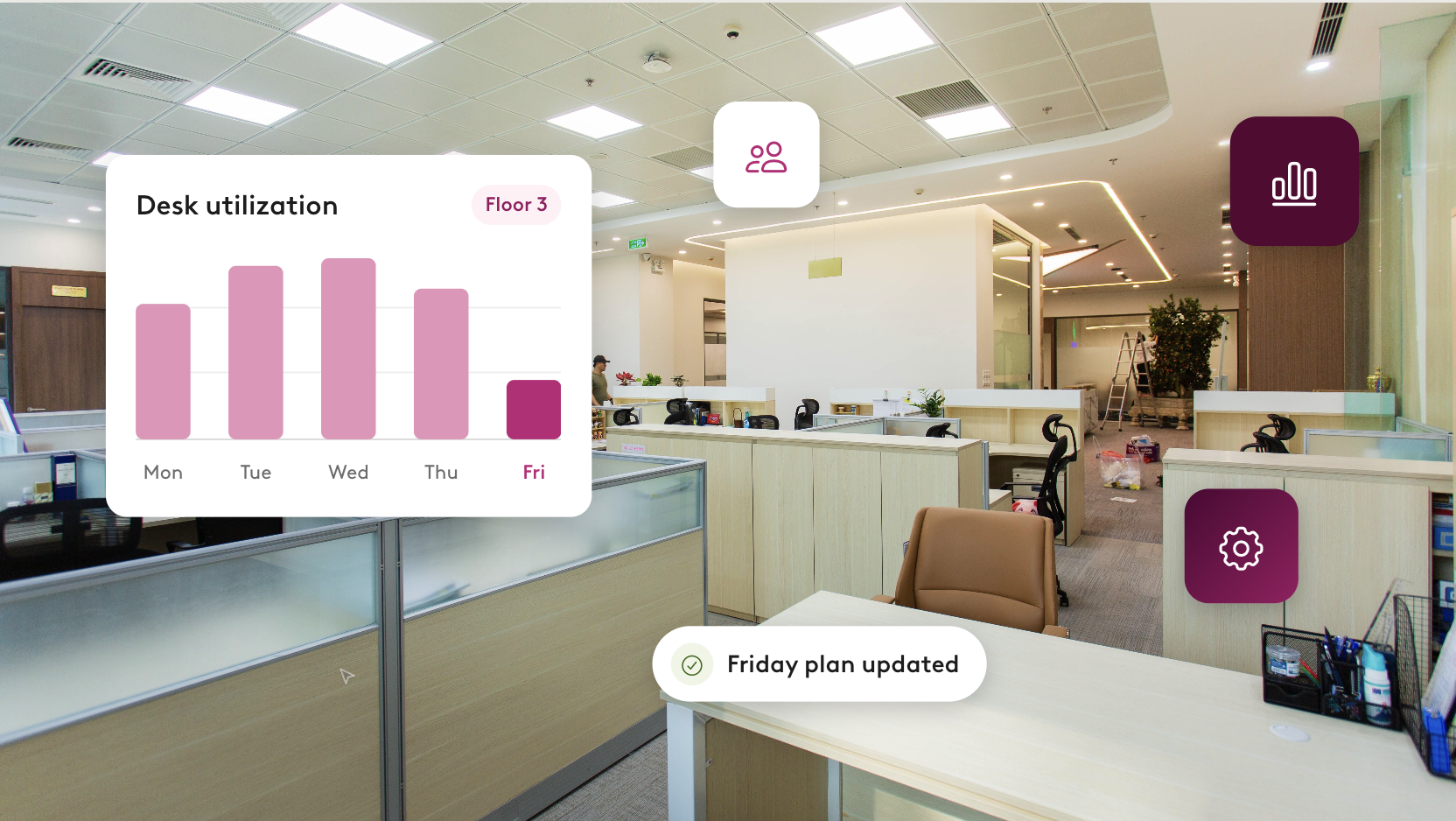


It's 8:40 on a Monday, and you open your email to a request from a VP asking if Engineering can fit eight new hires on Floor 4. HR just flagged three departures you hadn't heard about. Two teams are quietly fighting over the same corner of Floor 3. And the CFO's office wants "a quick read" on the current lease and whether they need to expand when it’s up.
The answers to all of these questions exist, but they're scattered across seating charts, attendance records, HR spreadsheets, and a floor plan that was last updated 2 quarters ago.
Thankfully, there’s another way to manage all these incoming requests. When an AI assistant is connected to your workplace data, it can answer most space planning questions in seconds. It handles the lookups, runs the math, and can even visualize proposed plans all in a single conversation. That's exactly what happens when you connect Claude to Robin.
Below are 9 ways facilities managers can use Robin and Claude to automate common tasks and get time back in their day.
How can facilities managers use AI? 9 practical ways
Facilities managers can use AI to map and reshape their stack plan, assign seats for new hires, model real estate scenarios, right-size meeting rooms, and prioritize facilities work. Keep reading to get more details on each of these use cases, along with a prompt for each to try yourself.
Use Case #1: See who sits where across every floor
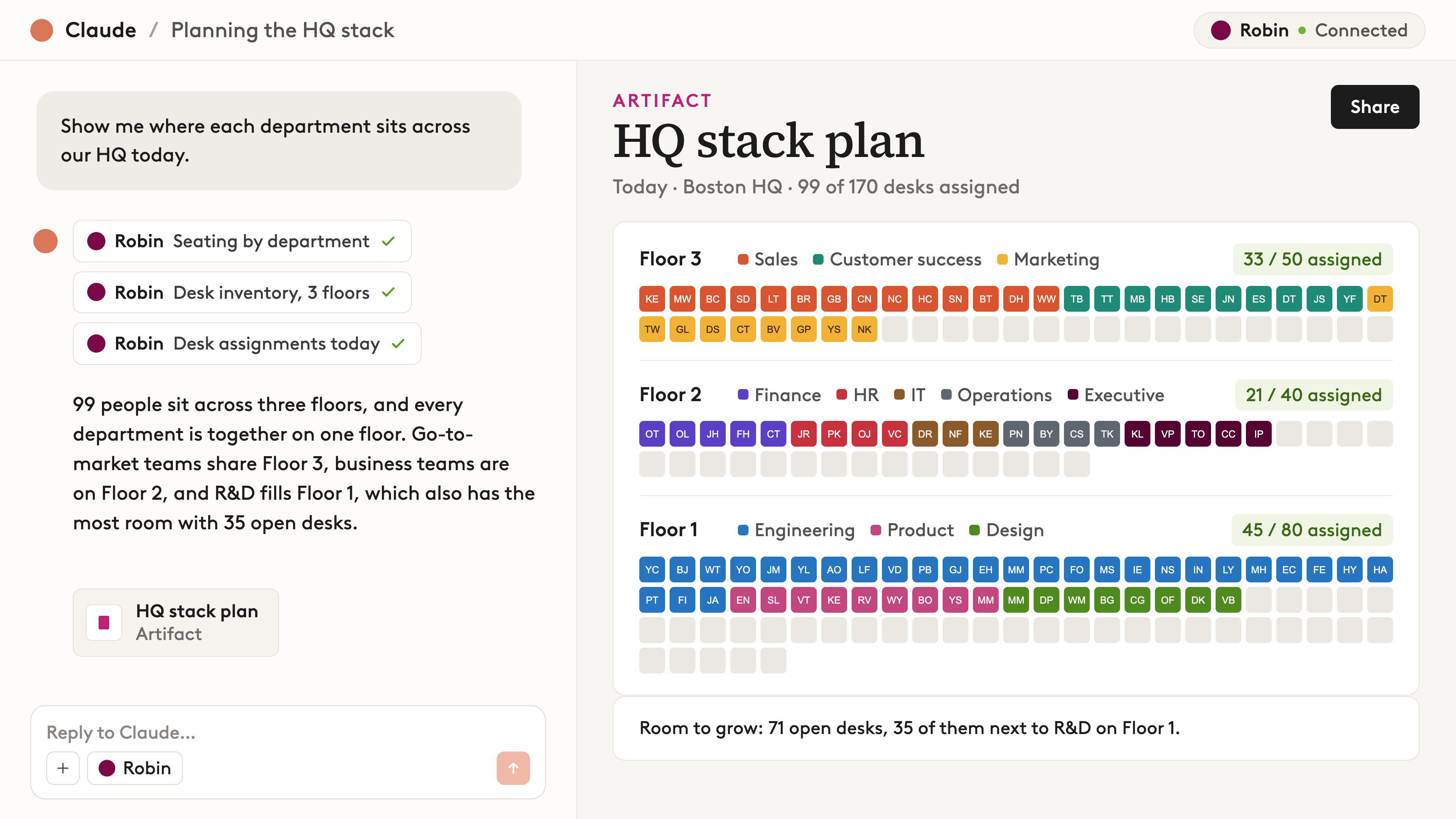
Almost every space decision starts with knowing where everyone sits today, whether you're seating new hires, consolidating a team, or freeing up a floor. But getting that view usually means pulling an export for every floor and lining them all up against the org chart by hand. Now, you can ask Claude to give you a quick glimpse of your office’s seating arrangements in seconds.
The prompt: "Show me where each department sits across the [building name] office."
What you’ll get back: Claude pulls live desk assignments and recaps who is sitting where. You can ask it to group by department, job title, or reporting line. This is a great prompt to start with so that you get a high-level view of your office before modeling any new scenarios.
Use Case #2: Test real estate scenarios before you commit
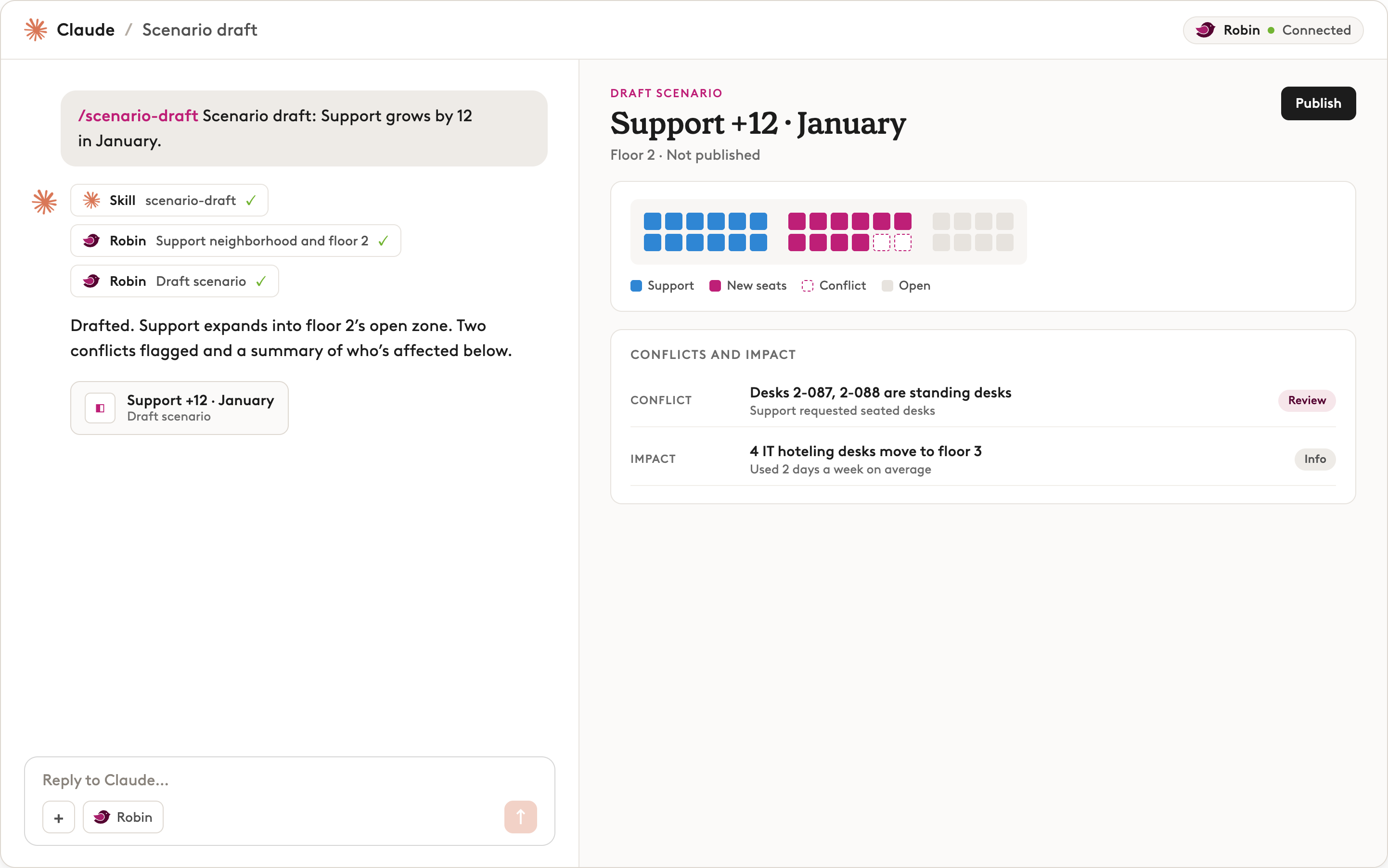
Deciding whether to shrink your footprint, merge two offices, close a floor, or expand into a new space used to take days in a spreadsheet. Now, you can just ask Claude to draft up a scenario for whatever you want to see.
The prompt: "Reassign users to show me what my floor plans would look like if we cut a floor from our building."
What you’ll get back: Claude might ask a few quick questions first, then it'll come back with a detailed plan, or a few to choose from. It will outline who would need to move how each floor's numbers shift, and share how much room you'd have left to grow on each floor. Everything in the chat will stay a private draft, so nothing will change in Robin until you hit publish.
Use Case #3: Put a price on your scenarios to find real estate savings
Once you've modeled a scenario, like cutting a floor, the next question is what it's actually worth. Instead of moving over to a spreadsheet, you can ask Claude to run the numbers right in the same conversation.
The prompt: "The [Floor #] is [X] square feet at [rate] per square foot. If we cut it, what would we save? Please include a widget where I can see my estimated real estate savings with each floor plan option.”
What you'll get back: Claude works out your estimated savings and shows the math, so you can check it. If your scenario had more than one option, like picking between 2 floors to cut, you can compare them. Ask Claude to add a savings calculator to your sandbox, and you'll see the estimated savings for every option side by side.

Use Case #4: Find room when you're out of desks
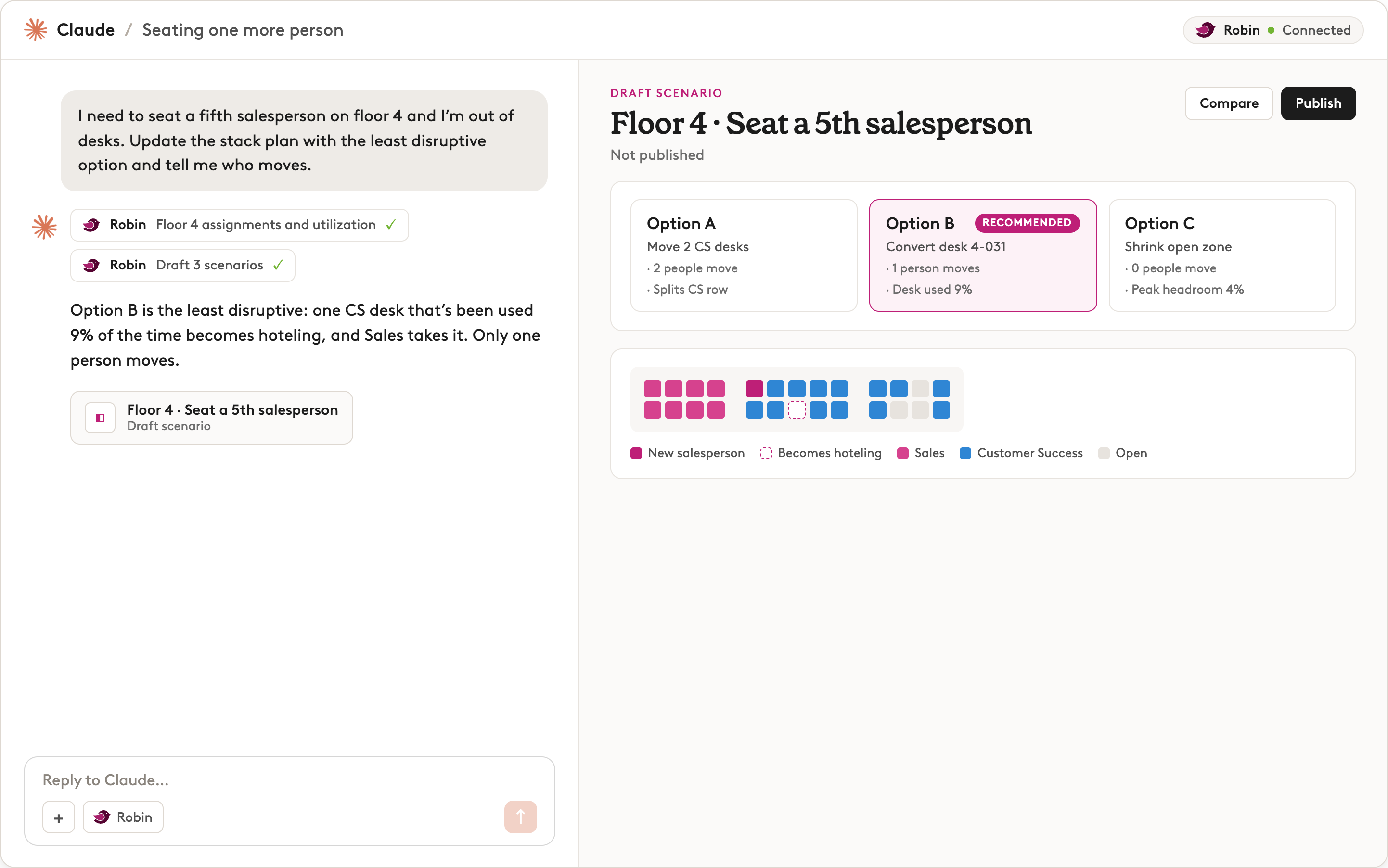
A new hire joins a team, but their floor is already full. Finding them a desk usually means moving someone else, and figuring out who to move without upsetting the whole floor takes time. Thankfully, now you can work through the options in seconds to find the move that causes the least disruption.
Prompt: "I need to seat another [role] on [floor number] and I'm out of desks. Update the stack plan with the least disruptive option and tell me who moves."
What you’ll get back: Claude will suggest changes, listing the names of anyone affected and even detailing the tradeoffs of each proposed switch to help you make the right decision.
Use Case #5: Move a whole team between floors
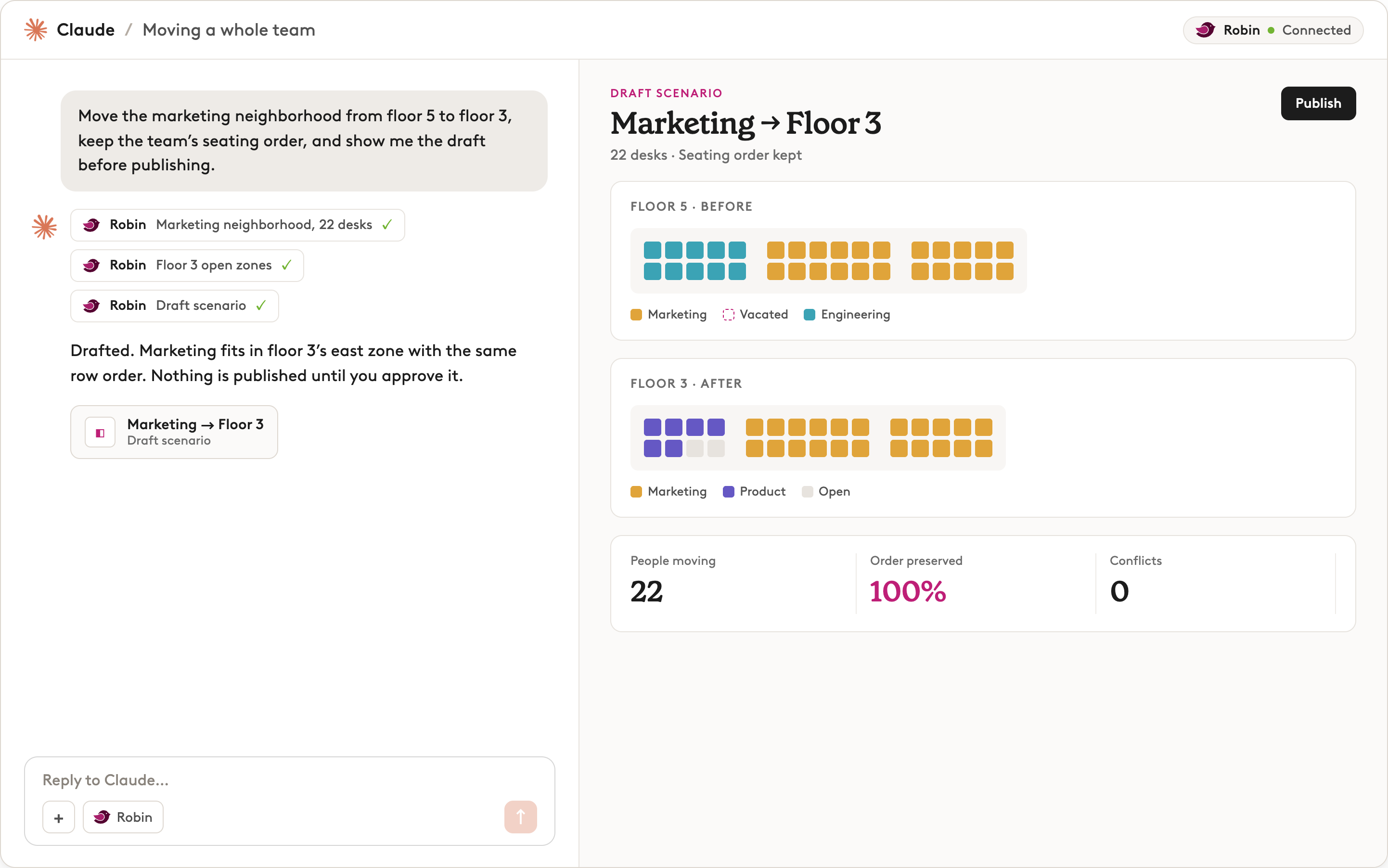
Moving a team to a new floor used to mean redrawing their neighborhood desk by desk, then double-checking that everyone landed next to the right people. It's tedious work! Now you can just describe the move to Claude, and it will draft the new layout for you, keeping the team's seating order intact so nobody loses their neighbors.
The prompt: "Move the [department name] team from [current floor] to [new floor], keep the team's seating order, and show me the draft before publishing."
What you’ll get back: Claude will propose a plan to move the group across floors in a way that preserves their neighborhood. You can then review the scenario, request any additional changes and then publish the plan so it’s reflected in Robin.
Use Case #6: Turn a hybrid policy into a floor plan
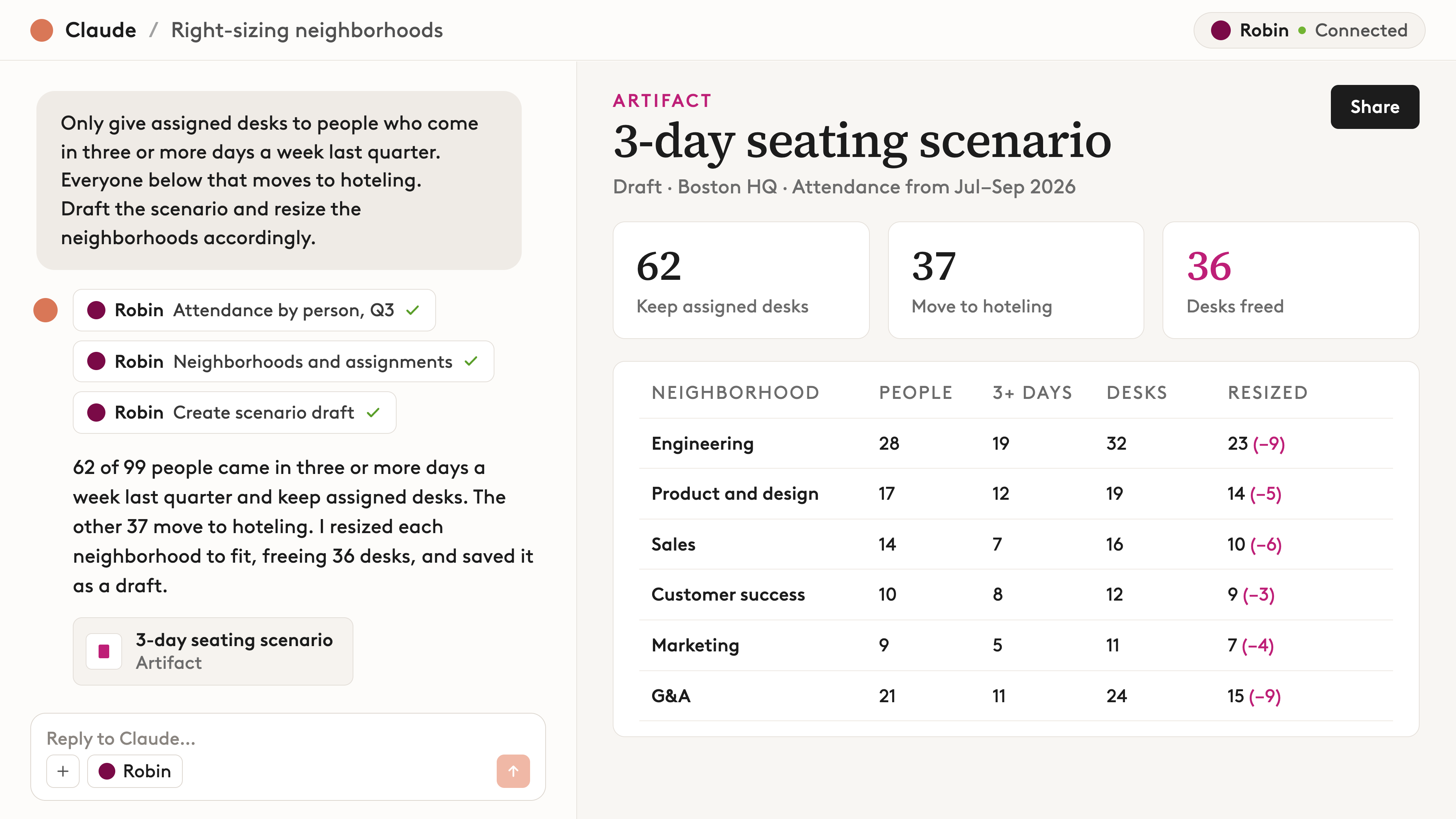
Most hybrid work policies live in a slide deck. Turning one into actual seat assignments is slow, detailed work. With Claude, you just state your attendance threshold and the period to measure it over. Then Robin counts each person's attendance from their desk bookings and check-ins, and Claude uses those numbers to draft a scenario that applies the rule across the building and resizes each neighborhood to fit. Voila!
The prompt: "Only give assigned desks to people who come in three or more days a week last quarter. Everyone below that moves to hoteling. Draft the scenario and resize the neighborhoods accordingly."
What you’ll get back: A draft floor plan scenario that shows who keeps an assigned desk and who moves to hoteling, based on how often each person actually came in. From there, you can ask Claude to make adjustments, like carving out exceptions for certain roles or reworking a neighborhood.
Use Case #7: Check desk capacity against your hiring plan
It's easy to approve a hiring plan without checking whether there are enough desks for everyone. When nobody compares the two, you find out the office is too small after people have already started. Claude can check your hiring plan against your current seating in seconds, so you know what needs to change before new hires arrive.
Prompt: “We're hiring [number of new hires] people next quarter. What does that do to our current seating, and what would we need to change?”
What you'll get back: A clear read on whether your current space can fit the new hires, and if not, a list of changes that would make room. From there, you can ask Claude to plan seating for the new hires by department or manager, so each team's new people land near the rest of their team.

Use Case #8: Find spaces that aren't pulling their weight
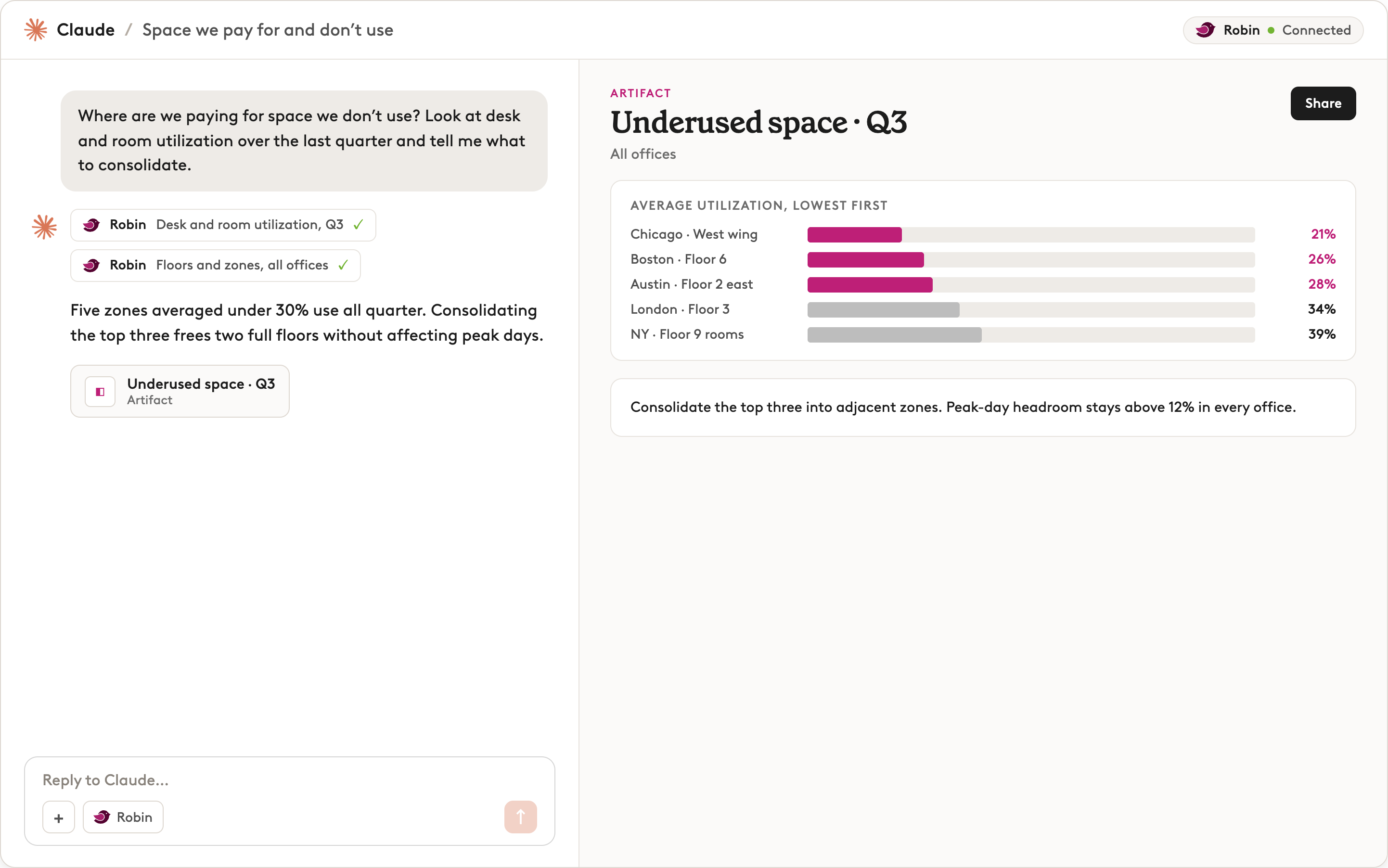
Every office has space that sits empty most of the week: the half-full neighborhood, the room nobody books, the desks reserved and then abandoned. It all still costs you, but finding it by hand means exporting and cross-referencing reports floor by floor, which is why so many space planning decisions often come down to gut feel. Because Robin tracks how desks and rooms are booked and used, Claude can scan your whole portfolio at once and show you where space isn't earning its keep.
Prompt: "Where are we paying for space we don't use? Look at desk and room utilization over the last quarter and tell me what to consolidate.”
What you’ll get back: A clear picture of which desks, rooms, and neighborhoods barely got used last quarter, with the numbers to back it up and suggestions for what to consolidate. Claude will also flag patterns you might not have noticed, like rooms that get booked all the time but are then ghosted, or areas that only fill up on certain days of the week.
Use Case #9: Prioritize facilities work by how space is booked
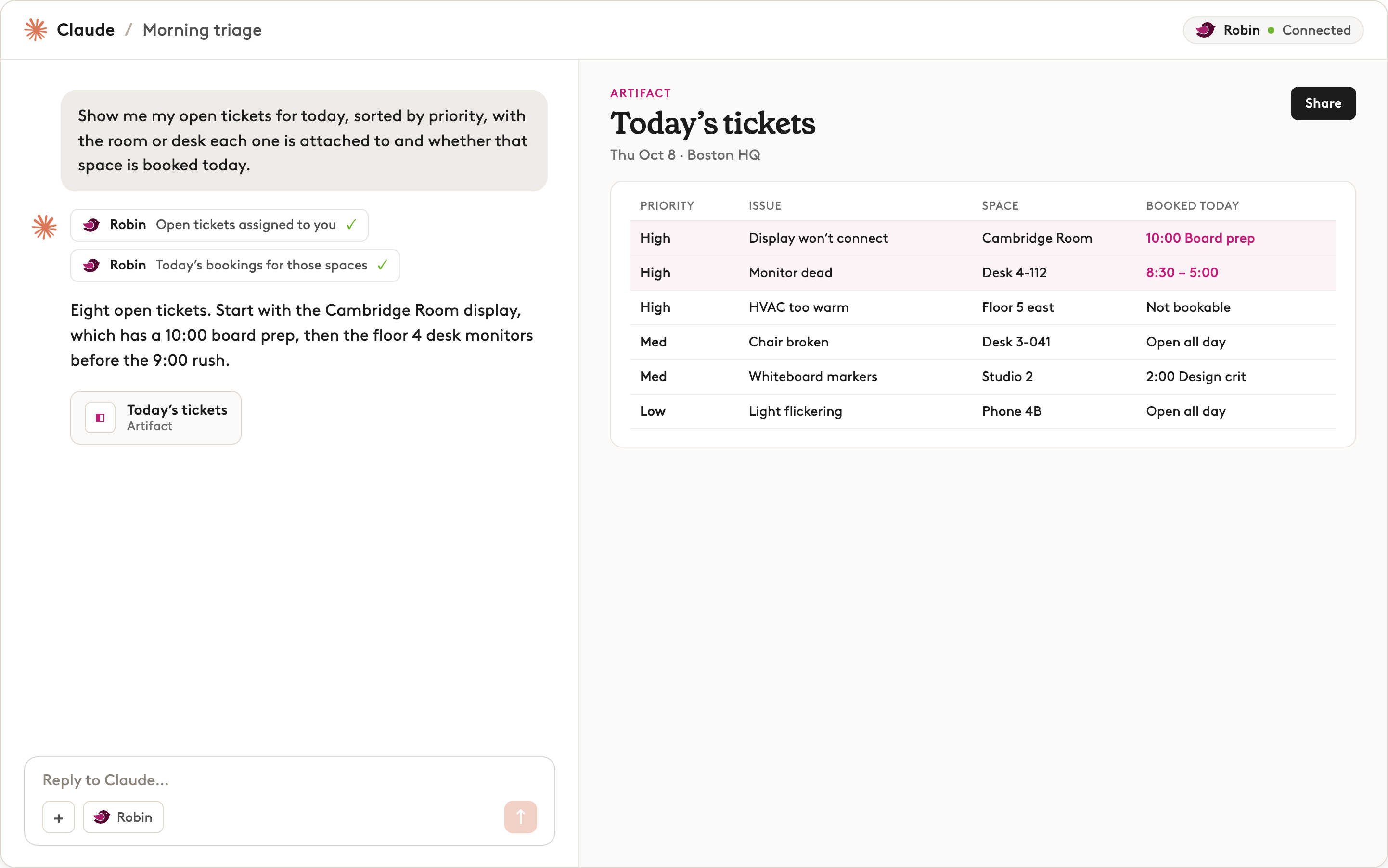
A broken display in an empty room can wait. The same display in a room booked for a 10am client meeting can't. Yet most ticket queues don't show you that difference, so it's easy to fix the wrong thing first. Robin knows which spaces have issues and which ones are booked, so Claude can show you what to fix first.
Prompt: "Show me my open tickets for today, sorted by priority, with the room or desk each one is attached to and whether that space is booked today."
What you’ll get back: Your open tickets in priority order, each one tied to its room or desk and whether someone's using that space today. That way, your team can start the day working on what matters most instead of whatever came in first.
How do you write better AI prompts for space planning?
Getting helpful responses from AI depends on the quality of the prompts you give it. Here’s a couple tips to make sure your AI prompts hit the mark:
- Name your goal. Let the AI know what you’re trying to achieve with these changes. E.g. Driving collaboration, cutting real estate costs, and making room to grow.
- Give your constraints. Make sure to call out if there are any variables that the AI needs to consider when proposing changes. This could be teams that can't be split up or floors that are off-limits to change. By naming these early, you’ll get to an adequate plan faster.
AI space planning FAQ
Do I need to learn special prompts to use AI for space planning?
No, plain language works fine for AI space planning. That said, you can get sharper answers by specifying your goal and listing any constraints.
Will AI change my floor plan without my approval?
No, AI won't change your floor plan until you approve it. Every change lives in a private draft until you review it and publish, or tell Claude directly to publish it.
Can employees see data they shouldn't?
No, Claude respects Robin's existing permissions, so people only see data their role allows.
Does Robin only work with Claude?
Claude is Robin's first AI integration. Next, we’re building connectors to work with other popular AI models.
Can AI tell me whether assigned desks are actually used?
A stack plan on its own can't tell you whether assigned desks get used. It shows who's assigned where. Pair your stack plan with attendance and booking data to get a better understanding of office usage.
Why does it sometimes take a minute to respond?
AI takes longer on bigger requests because it's doing more work. Pulling up a floor plan might take about 30 seconds. Building a seating plan for a whole building from usage data takes a little longer. Either way, it's a fraction of the time the same work takes by hand.
Get started with AI space planning
For years, space planning ran on guesswork thanks to unreliable data, clunky spreadsheets, and plans that went stale the week they were finished. Now Claude and Robin work together to give you a full picture of your office.
Already a Robin customer? Turn on the Robin connector in Claude and try one of the prompts above on your own building.
New to Robin? Book a demo to watch a stack plan get built, tested, and published in a single conversation.