

Office Move Checklist: A Step-by-Step Planning Guide
.png)


Key Takeaways
- An office move requires a lot of coordination. Start planning 6–8 months before your target move date if possible to avoid rushed decisions and surprise costs.
- Assign one clear owner (or small team) to run point on every moving decision.
- Make sure to budget for more than just the movers. New furniture, IT setup, signage, and lease restoration costs add up fast.
- Communicate with employees early and often. Most move-related stress comes from uncertainty, rather than the actual moving tasks themselves.
- Use the move as a natural checkpoint to reassess your floor plan and workplace tech stack.
Planning an Office Move
If you're staring down an office move and don't know where to start, you've come to the right place!
The good news: office moves are usually stressful because they're unfamiliar, not because they're complicated. This guide helps by breaking down the process into six clear phases, from your first budget conversation to the moment your team walks into your new space. While the checklist may seem long, remember that the hardest part is getting started. Follow the tasks in order, lean on your team for help, and you'll get through this move with ease.
What are the Most Common Office Moving Mistakes?
Most office moving mistakes happen because teams forget to plan for certain tasks or questions. Here are the mistakes that come up most often:
- Assuming services are included in the moving quote. For example, packing supplies and furniture disassembly are often billed separately, so ask for an itemized breakdown before you sign a contract with movers.
- Treating the floor plan as a one-and-done document. Teams often finalize a layout, hand it off, and never touch it again, only to find themselves stuck weeks later when the leadership team has edits. A floor plan that's easy to update yourself will save you a lot of back-and-forth down the line.
- Forgetting to check for early lease termination fees. This can be an expensive surprise if it's not budgeted for months in advance.
- Not backing up files before the move. Equipment can get bumped and boxes can go missing during a move, so make sure to back up any important documents before moving day to avoid unnecessary headaches.
- Skipping vendor insurance requirements. Many large office buildings won't let movers or contractors in without a Certificate of Insurance (COI) on file. Make sure to confirm this weeks ahead of your move to give yourself plenty of time to get it.
- Underestimating network drops. It's far easier to plan a few extra WiFi/network connection points now than to run new cable after the walls are already finished in your new space.
- Waiting too long to set up wifi. Wifi can take weeks or even months to set up properly. Make sure to reach out to your internet service provider (ISP) early in your moving process to make sure your network is up and running for move-in day.
The good news here is that none of these are hard to avoid, they just have to be on your radar early.
Where Do I Start If I’m Feeling Overwhelmed?
.webp)
The three most important pieces of starting your move are assigning a single owner, notifying your current landlord, and getting moving quotes from local moving companies.
If you just found out about an office move and don't know where to begin, do these three things this week. Everything else can wait.
- Assign an owner. One person or small team should be the point of contact for every moving decision. Otherwise, the project will get disorganized due to lack of centralized planning and communication.
- Request moving company quotes. Get two or three so you have options once your timeline firms up. Ask each company for 2 quotes: 1 for packing + moving, one for just moving. Make sure to be clear on what the quote includes: will they disassemble furniture? How many movers are included?
- Notify your landlord. It’s best to let your landlord know as soon as you decide to move out. Giving them a heads-up early can earn you goodwill and more flexibility later. If relevant, make sure you understand any rules about breaking your lease.
Once you've finished those first three steps, it’s time to map out your full moving to-do list. The best way to start is to spend 10 minutes reading this article and build out your game plan.
Do I Have to Handle the Office Move Alone?
No and you shouldn’t try to. One of the biggest sources of move-related stress is feeling like everything rests on one person. We recommend assembling a moving team with internal and external partners.
That team can consist of:
- Internal team leaders that communicate moving updates and assign packing tasks to their respective departments.
- Professional movers that handle furniture disassembly, workstation packing, and cubicle teardown, in addition to moving all your office furniture.
- A workplace operations platform to take some of the floor-plan legwork off your desk. Many teams still assume they need an architect or CAD specialist involved every time a layout needs to be drawn up or adjusted, but self-service tools now let workplace teams build and edit maps themselves.
Additional team recommendations for larger moves:
- Custodial or cleaning staff that run monthly cleanouts leading up to the move, so decluttering doesn't fall entirely on your employees.
- IT vendors can often handle equipment disconnect/reconnect and cabling, rather than your internal team doing it all manually.
- A full-service move management company can take the entire floor plan and placement process off your plate if your organization is large enough to justify the cost.
Remember, moving an entire office is a team effort. If a task on the checklist below feels like too much, ask yourself: does this have to be me, or can I hand this to someone else on the list above?
How do I Move Our Office?
Moving your office comes down to six phases, each tied to a specific point in your timeline before and after the move date. In the next few sections, we’ll break down each of these phases into its own checklist.
Phase 1: Early Planning
The earliest phase of your move sets the foundation for everything that follows. This is where you assign ownership, lock in your budget, and get the key details in place like your lease terms, landlord notice, moving company quotes, and new floor plan. Getting these pieces right early on gives you room to negotiate, avoid surprise costs, and keep the rest of the move on track.

Phase 1 Moving Checklist
- Assign an owner. Pick one person or small team to run the move and be the main point of contact.
- Get leadership buy-in on your proposed moving schedule. Support from the top will reduce pushback from the team further down the line.
- Notify your current landlord that you won’t be renewing your lease.
- Get moving company quotes (packing+moving and moving-only) and confirm exactly what services are included. Consider a full-service move company (e.g., JLL) for large orgs.
- Meet with building management (old and new) to learn moving rules like union requirements, allowed hours/days, required walkthroughs, etc.
- Review your lease and get restoration estimates. Check "make-good" requirements and early-termination fees in your current lease, then get contractor quotes for restoring your current space (e.g. patching, painting, cable removal, cleaning).
- Set a preliminary budget. In addition to movers, factor in any new furniture, signage, office supplies, repairs, and/or cleaning you’ll need.
- Decide on a new-space floor plan. You'll need a plan for your new office layout before figuring out your network/WiFi drop counts, desk assignments, or where meeting rooms and shared spaces will live.
How Do I Plan My New Office Layout?
When planning a layout for your new office space, it’s best to start with how your teams actually work. Let the network, furniture, and room counts follow from that.
Your floor plan is the backbone of pretty much everything else on this checklist. It determines where your network drops go, how many desks fit where, and how employees will actually move through the space day to day. Getting it right early saves you from re-running cable or re-tagging furniture later.
A few things worth thinking through as you blueprint the new space:
- Plan for how teams will actually use the space. Are you supporting a fully in-office team, a hybrid model, or a mix depending on department? That answer shapes how much of your new office needs to be dedicated desks versus shared or bookable space.
- Map IT and spatial needs together. These needs include where your server room sits, how far it is from where the ISP line enters the building, and how many drops each area needs are all layout decisions. Nailing these down before you finalize the floor plan (rather than after) avoids a lot of rework.
- Expect the floor plan to change. Even after move-in, most offices shift walls, add desks, or reorganize a department within the first year. Traditionally, these changes meant going back to your building management company for updated floor plans. This process can take days or weeks, even for a fairly small update.
If you're not sure where to start on the "how teams will actually use the space" question, a framework from Harvard Business School professors Maria Roche and Andy Wu offers a useful starting point. They suggest beginning with two questions: What's your strategy for future growth? And what's the size of the organization you need right now?
Mapping the answers helps clarify how your team needs should translate into physical (or virtual) space, and where to strike a balance between areas built for collaboration and areas built for focused, heads-down work.
That balance matters more than it might seem. Gensler's U.S. Workplace Survey of more than 2,000 knowledge workers found that only one in four respondents were working in an environment that supported both collaboration and focus. The rest reported real difficulty working efficiently, which fed directly into lower productivity, innovation, and engagement. A move is one of the few chances you get to fix that from the ground up, rather than retrofitting an office that was never designed with this in mind.
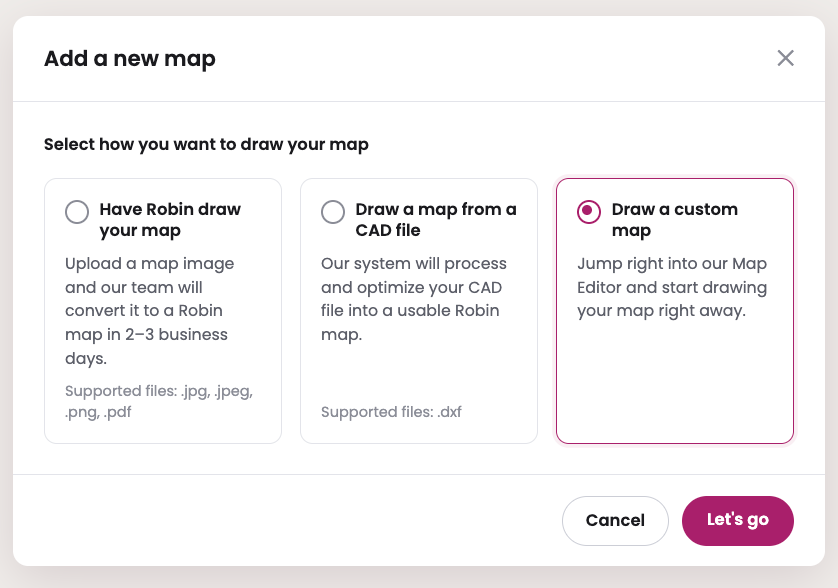
This is where workplace platforms have started to close the gap. Robin, for example, lets teams upload existing AutoCAD (.dxf) files directly and generate a workable digital map in seconds, rather than manually recreating the layout. From there, workplace teams can adjust walls, add or move desks and meeting rooms, or upload a revised CAD file over an existing map, all without touching CAD software themselves or waiting on outside help. It's a small thing during the move itself, but it matters more in the months after, when a reorg or renovation would otherwise send you back to square one on your floor plan.Teams can also build their maps from scratch, if they don’t have a CAD file to upload.
Phase 2: Vendor & Building Setup
With your budget and floor plan in place, it's time to line up the vendors and infrastructure that will make your new space functional. This phase is about locking in your movers and getting IT and your tech stack ready to go, so there are no gaps in operations when you arrive.

Phase 2 Moving Checklist
- Finalize your pick for movers. Confirm your movers can handle tech or have IT present at their walkthrough, and get their damage claims process in writing.
- Scope out wifi. Contact your ISP early to confirm availability and lead time for setting up wifi in your new building.
- Pick your office hardware vendor. It’s important to pick the right hardware vendor for your new space, as it’s an easy decision to rush and an expensive one to get wrong. Reach out to different partners and see who offers the best combination of tech like meeting room equipment, digital signage, and presence sensors for your team. Make sure to give yourself plenty of lead time for order and delivery.
- Plan your setup order for moving day and share the plan with your moving team. We recommend: server room/furniture → computers/phones → personal items → AV → cables.
- Purge old IT equipment like cables, adapters, broken devices. Arrange for someone to come pick them up or recycle it at a specialized facility.
- Evaluate your workplace tech stack. While you're already lining up IT and infrastructure for the new office, take stock of the tools that support how your team works day-to-day like desk booking, conference room scheduling, and visitor management.
Is My Office Move a Good Time to Rethink My Tech Stack?
Yes, your team is already adjusting to change, which makes it the easiest moment to introduce new tools. Here's why: while you're already scoping out WiFi and IT setup for the new space, it's worth taking a step back and looking at your broader workplace tech stack too. The way people work has changed a lot in the last few years, and the tools supporting that work often lag behind. Things like desk booking, room scheduling, visitor management, and office layout management are all worth a second look.
There's a practical reason a move is a good moment to do this, beyond just convenience: your team is already in the mindset of adapting to something new. Introducing an additional tool or process on top of business as usual is a harder sell than introducing it alongside a move employees are already adjusting to.
This is a pattern our team sees often with customers. VHB, for example, has made a habit of introducing Robin at each of their offices specifically during moves and renovations.

As VHB's IT Operations leader, Dale Arnt, put it: "Whenever we would do a significant office renovation design or move offices, we would make the transition. Like, okay we're adding in 20 desks and we're doing some layout changes, it just made sense to introduce Robin as a part of that transition."
If your current tools for booking desks, scheduling rooms, space planning, or managing visitors feel more like a workaround than a real solution, your move is as good a time as any to change that.
Phase 3: Purge, Notify & Prep
As the move date gets closer, it's time to start preparing physically. This phase covers looping in your employees, deciding what furniture stays or goes, and gathering the packing supplies you'll need. Starting this early gives your team enough time to pack without feeling rushed.

Phase 3 Moving Checklist
- Formally notify employees about the move. Give them a timeline and clear expectations for what they’re responsible for. Then keep repeating key timeline details as questions come up.
- Make a plan for furniture. Tag what's moving, arrange junk removal/liquidation for what's not moving, and rent a dumpster if needed to discard any furniture that you want to pitch (you can also check if your current building has one you can borrow).
- Set up shredding bins early. If you have lots of paperwork you need to move, start by confirming with your team which records must be kept vs. which can be shredded.
- Set up a donation area, and inventory everything the office owns (including small items) to avoid re-buying duplicates later. Anything your team doesn’t want or use, should go in the donation area.
- Create a seating chart (old desk → new desk) to share with your team and the movers.
- Create a map and signage for your new office so employees can easily familiarize themselves with the new space and find their way around the office on their first day.
- Order any necessary packing supplies. If your moving company is packing everything, then you can skip this step. Otherwise, you’ll want to provide your team with boxes (1–2 per employee) and tape/labels.
Phase 4: Communication & Packing
In the final weeks before the move, it’s time to shift focus to final logistics and loose ends. This phase covers updating your address across accounts and vendors, confirming insurance coverage, and finalizing the details that keep move day running smoothly.

Phase 4 Moving Checklist
- Arrange keycard/fob access for employees to access the new building and a return process for old ones. Communicate the process with your team.
- Update insurance. Cancel your old policy the day after move-out, start your new policy the day before you move-in to the new space.
- Schedule old-office utility cancellations to line up with your move-out date.
- Handle change-of-address with the post office, bank, and any vendors/subscriptions that mail you things. Also make sure to update your company address anywhere else it's listed like email signatures, letterheads, your website, or online listings.
- Notify clients of the move via email or newsletter if it affects mail, visits, or deliveries.
- Make sure employees clean out their areas in the current office before the move. Set a hard cutoff for grabbing personal items from the old space before cleaners come in. One fun way to do this is by hosting a packing party, provide pizza and snacks to boost engagement.
- Back up all important documents/files before the move.
- Confirm final mover details (schedule, team size) in writing, and reserve parking/loading bay space if needed.
- Write an hour-by-hour move schedule and share a written plan with the movers to know exactly what goes where when they take everything to the new office.
- Update emergency plans and evacuation maps for the new space, to make sure staff will know where exits, fire extinguishers, and first aid kits are located.
Phase 5: Move Day
This is the big day! Phase 5 covers what to check before and after the movers arrive, including a final walkthrough of your old space and a defect inspection of your new one, so you catch any issues before they become disputes.

Phase 5 Moving Checklist
- Do a final walkthrough of your old space. Check every room, closet, and storage area for anything left behind, and take photos for your records.
- Complete a defect inspection with your landlord (old space). Document the space's condition together to avoid disputes over your security deposit or make-good obligations later.
- Confirm keys, fobs, and access cards are returned or transferred. Make sure old space access is properly handed back and new space access works for your team.
- Do a walkthrough of your new space before move-in. Note any existing damage, unfinished work, or issues so you're not held responsible for pre-existing problems.
- Have your point of contact on-site all day. One person should be reachable to answer questions, direct movers, and make real-time decisions.
- Check off inventory as it arrives. Confirm nothing was lost or damaged in transit, and flag issues with the movers immediately.
- Set up critical systems first. Follow your planned setup order (server room/furniture → computers/phones → personal items → AV → cables) so IT and network access come online early.
- Test wifi, phones, and key equipment before employees arrive. Catch connectivity issues while movers or IT are still on-site to fix them.
- Post signage for restrooms, exits, and key areas. Helps employees orient themselves on day one without needing to ask.
- Take photos of the completed setup. Useful for your records and for comparing against the original floor plan.
Phase 6: After the Move
The move isn't over once the boxes are unpacked. This phase covers giving your team a tour of the new facility and settling into the ongoing upkeep that keeps your new space running well.

Phase 6 Moving Checklist
- Arrange a facility tour for staff so they can easily find the bathrooms, kitchen, and meeting spaces in their new office.
- Test security systems and access badges. Confirm door locks, alarms, and key cards all work as expected before relying on them.
- Restock office supplies and kitchen essentials so the space feels ready to use from day one.
- Do a post-move IT check-in a week or two after move-in to catch any lingering connectivity or equipment issues.
- Collect employee feedback on the new space and moving process. This helps you catch small issues early and informs how you plan the next move.
- Keep your floor plan current. As desks get added, teams reshuffle, or a wall comes down for a renovation down the line, being able to update the map yourself keeps desk booking and wayfinding easy for your team.
Ready to Start Planning Your Move?
Moving offices is a big undertaking, but you can make it manageable by breaking it into these six phases. Remember to start early, assign clear ownership for each task, and work through each phase step by step, and you'll set your team up for a smooth transition into your new space.
If you're also using this move as a chance to upgrade how your team books desks, schedules rooms, manages visitors, or plans your space, Robin can help you hit the ground running on day one.
Frequently Asked Questions
How far in advance should I start planning an office move? Ideally, 6 to 8 months before your target move date. This gives you enough time to set a budget, get moving company quotes, review your lease for early-termination fees, and plan your new space's layout and network setup without rushing.
What's the biggest mistake companies make when moving offices? Assuming a moving company's quote covers everything. Always ask for an itemized breakdown before signing.
How do I keep employees calm during an office move? Communicate early and often, even when there's nothing new to report. Give employees clear expectations for what they're responsible for, assign trusted helpers to answer questions, and consider a low-stakes event like a packing party to make the process feel less overwhelming.
Who should be in charge of an office move? One clearly designated owner, whether that's a single person or a small team, should serve as the main point of contact for every moving decision. This prevents tasks from falling through the cracks and gives employees one place to direct their questions.
What should I do first if I just found out about an upcoming office move? Start by assigning an owner, notifying your current landlord, and requesting a moving company quote. Everything else can be worked through phase by phase from there.