
What is Appspace? A Complete Overview of Features, Pros, Cons, and Alternatives


Appspace is known as an employee communications and digital signage platform, but choosing a workplace platform isn't just about how you broadcast information. It's about how your office actually runs, from booking and space planning to utilization reporting and daily coordination.
This guide breaks down what Appspace does well, where teams run into tradeoffs, and how it compares to a purpose-built workplace operations platform like Robin.
What Is Appspace?
Appspace is a workplace technology company that combines digital signage and employee communications in one platform.
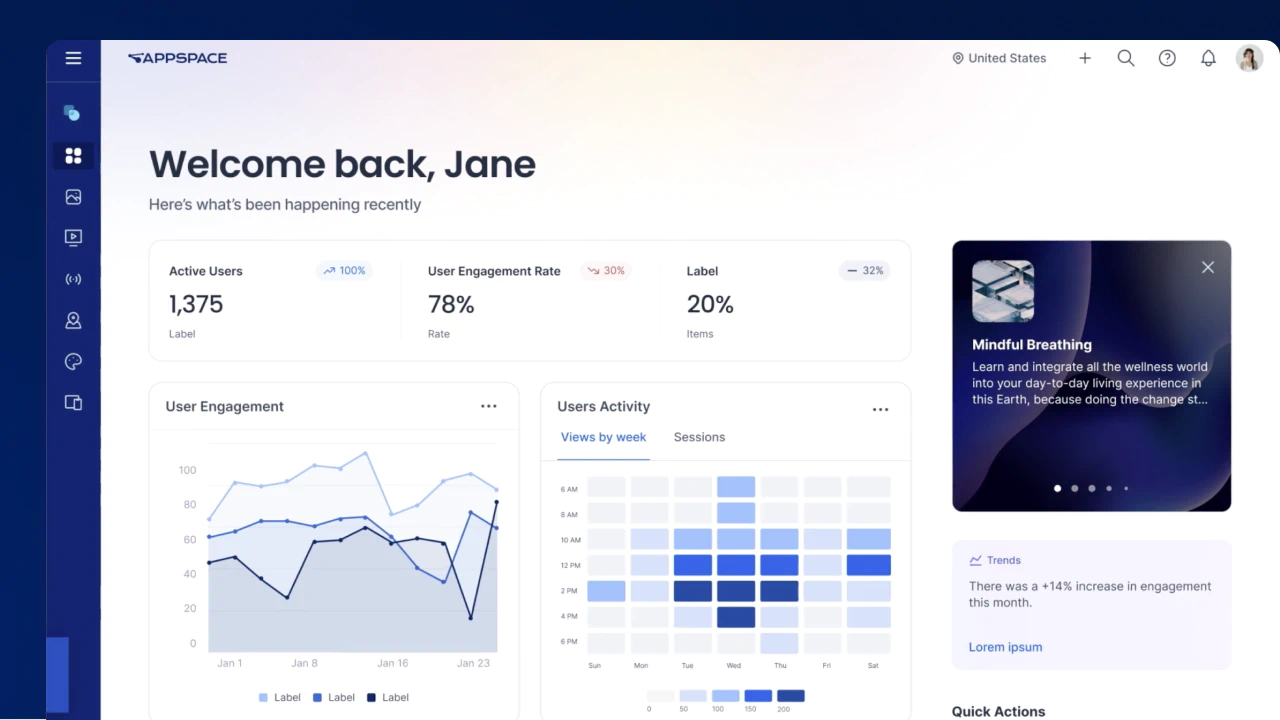
At its core, Appspace focuses on:
- Digital signage, intranet, and employee communications
- Desk, room, and amenity reservations
- Indoor maps, wayfinding, and workplace search
- Integrations with HR, IT, IWMS, Zoom Rooms, and Microsoft Teams Rooms
Appspace works well if your main goal is getting messages to employees through screens and apps. That said, if you’re looking for a system to actually help run your office, you’ll likely need more than a communications-first product is built to give.
Appspace Pros and Cons
Appspace pros
- Signage and communications strength: A mature platform for screens, announcements, intranet content, and internal communications.
- One suite: Reservations, signage, communication, and analytics under one vendor can reduce the number of tools a communications or IT team manages.
- Modular expansion: Customers can start with a single use case, such as signage, and add modules over time.
- Enterprise integrations: Broad HR, IT, and IWMS integrations, plus native Zoom Rooms and Microsoft Teams Rooms support.
Appspace cons
- Workplace features sit inside a communications platform: Reservations, maps, and wayfinding are improving, but they live within a signage and comms product rather than a platform designed specifically for workplace operations.
- Limited delivery outside North America: Third-party industry consultants have noted constraints in in-region delivery capacity, support coverage, and localization during complex global rollouts.
- Slow content updates: One G2 reviewer said text updates take several steps (open, edit, confirm publication) and wished for a simple mobile edit view. Without a quick way to fix a line of text, urgent corrections have to wait longer to get fixed.
- Screens can fall out of sync: One reviewer noticed screens can desynchronize, which can erode your team’s trust in the screens over time.
- Strict room check-in: A CEO on G2 complained that rooms are released if you forget to check in, even when you’re already sitting in them. One missed button press can hand your room to another team, interrupting the meeting and sending everyone off to find a new space.
- Clunky reporting: Reviewers describe the tool’s reporting as clunky and rigid, making it difficult to create custom reports.
Is Appspace a Workplace Operations Platform?
No. Appspace is an employee communications platform first. Its core is screens, announcements, and intranet content, and visitors, wayfinding, and reservations were added on top of that foundation. Its messaging, roadmap, and engineering focus remain anchored in communications. As a result, the workplace pieces look familiar on the surface, but they don’t always give workplace teams the control they need to run a hybrid office day to day.
Depending on how much of the office a team is trying to run, this can show up as:
- Map changes that require a helpdesk ticket
- Space planning that stops at a floor map and filters
- Utilization data that sits in one module among many instead of driving space decisions
- Check-in and reminder rules that release rooms people are sitting in or keep prompting people already at their desks
- Rollouts that lean heavily on IT for devices, network access, and admin training
Questions to ask when evaluating Appspace for workplace operations:
- Is the core of the platform communications and signage, or day-to-day workplace operations?
- Will employees book desks and rooms in tools they already use, or in a separate employee app?
- How much control do workplace teams have to edit maps, change policies, and plan space on their own?
- How much IT effort does rollout take, including devices, network access, and admin training?
Does Appspace Support Hybrid Workplace Optimization?
Partly. Appspace has reservations, maps, wayfinding, and AI assistants that can tell you which rooms are free, how busy a floor is, or which rooms nobody’s using. That’s handy, and it’s worth giving credit for. But Appspace started out as a communications tool, and the hybrid features were added next to the screens and intranet rather than built from the ground up for hybrid work.
If you’re trying to get more people into the office, make better use of your space, or figure out what’s working, a quick answer about what’s available right now only gets you so far. You also need data you can trust, and a way to act on it: setting hybrid policies, right-sizing space, and deciding where teams should sit.
Most workplace teams want to know things like:
- Which teams are actually in the office at the same time?
- Are people using their assigned desks and neighborhoods?
- Where are we running out of space, and where could we give some back?
- Which policies change how often people come in?
Robin’s workplace analytics were built around hybrid work from the start. They pull utilization trends and office activity across buildings, floors, teams, and resources into one place.
Questions to ask when evaluating Appspace for your hybrid workplace:
- Can the AI just answer questions about the office, or can it help you plan and run it?
- Do you get hybrid insights out of the box, or does someone have to piece reports together?
- Can your workplace team go from an answer to an action, like a new seating plan, without waiting on IT?
How Does Appspace Handle Workplace AI and Analytics?
Appspace has added AI across its platform, but most of it is built around answering questions and creating content. That fits a product that started as a communications tool, but it's less useful if you’re looking for AI that can help you plan and run your workplace.
The AI also lives inside Appspace’s own employee experience platform, so employees have to go there to use it. And an assistant is only as useful as the workplace data behind it. One G2 reviewer recently noted that they haven’t seen much success with the new AI Summary feature. For workplace leaders who want answers they can act on, that’s worth testing in a demo before you take the AI claims at face value.
Robin takes a different approach: its analytics pull utilization, presence, and collaboration data from bookings, calendars, access control, sensors, and your HRIS into one place. The AI then works on top of all that data while following designated permissions, so employees only see what they’re already allowed to see, and planning tools are limited to workplace teams with planning permissions. This lets your workplace teams ask questions in plain language, forecast space needs, and see which desks and floors aren’t pulling their weight. In short, the AI doesn’t stop at an answer. It helps you plan, decide, and carry out the change from beginning to end.
Questions to ask when evaluating Appspace's AI and analytics:
- Does the AI stop at answering questions, or can it help build and publish a plan?
- Do employees have to open a separate platform to use it?
- Can you see the AI working on your own workplace data in a demo, not just on sample content?
Appspace Alternatives
Teams that look past Appspace usually want a platform built around running the office, not around broadcasting to it. These are the alternatives that come up most often in workplace software evaluations, and each one starts from a different core.
Robin
Robin is a workplace operations platform for hybrid offices. It covers desk booking, room scheduling, space management, visitor management, and workplace analytics in one platform. Employees can book inside Outlook, Teams, Google Calendar, and Slack, and through AI assistants like Claude via Robin’s MCP connector.
A good fit for: workplace teams that want to plan, run, and measure the office from one system.
Envoy
Envoy started as a visitor management product and has since added desk booking, room scheduling, and deliveries. Teams often begin with front desk and visitor workflows and expand from there. Read our full Envoy overview.
A good fit for: organizations whose first priority is visitor check-in and front desk operations.
Eptura
Eptura was formed by combining several workplace and facilities software companies. Its portfolio spans workplace booking, facilities and asset management, and integrated workplace management (IWMS). Read our full Eptura overview.
A good fit for: large enterprises that want workplace booking alongside facilities and asset management from one vendor.
OfficeSpace
OfficeSpace centers on space management, with floor plans, move management, and desk booking for facilities teams. Read our full OfficeSpace overview.
A good fit for: facilities teams whose main focus is floor plans, seating, and moves.
Robin vs. Appspace
When comparing Robin and Appspace, the biggest difference is platform philosophy. Robin is a unified workplace operations platform for hybrid work, with visitor management and employee experience included. Appspace was built around communications and signage, with workplace features added as the platform expanded.
Why Organizations Choose Robin Over Appspace
Teams that look at Robin alongside Appspace are usually asking a version of the same question: can the tool we already own for screens and communications also run the workplace? Often the answer is that running the office takes a platform built for it.
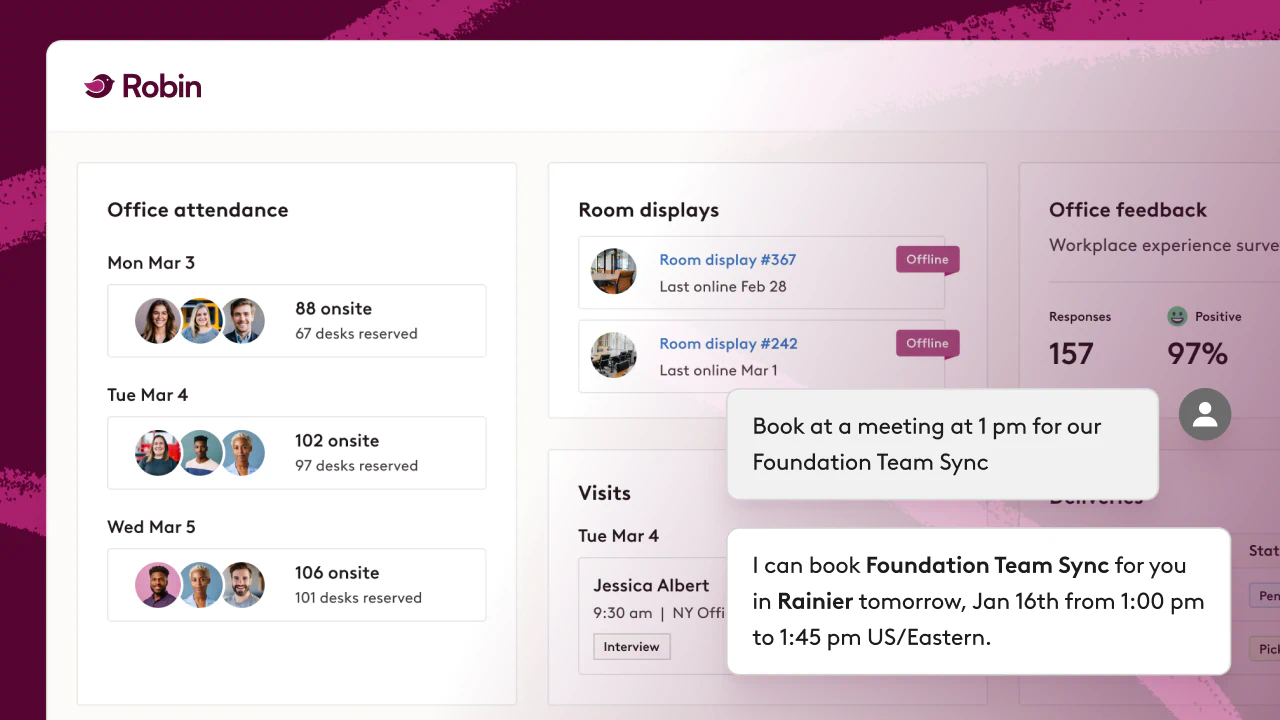
Organizations often pick Robin over Appspace for these reasons:
Robin is built for operations, not announcements
Robin coordinates the day-to-day work of people, spaces, meetings, and resources, instead of treating booking as an extension of messaging.
Robin is designed for adoption
Employees can easily book desks and rooms directly inside Outlook, Teams, Google Calendar, Claude and Slack, so the workflow follows them wherever they work.
Robin provides operational clarity and control
Workplace teams get self-serve control over maps, seats, and policies, and utilization data built to inform real estate and space decisions.
Robin works with your teams’ AI
Robin brings workplace planning into the AI assistant your team already uses, so teams start with the outcome they want and Robin builds the plan around how their company actually works.
When Should You Consider Robin Alongside Appspace?
Teams typically look beyond a communications-first platform when workplace needs to shift from informing employees to actually running the office. Common signals include:
You need to plan space, not just find it
Moving teams, consolidating floors, and building stack plans take more than a floor map and filters.
Utilization data needs to drive decisions
If you need to defend a footprint or attribute space to cost centers, depth of data matters more than the number of modules.
Packaging and pricing are hard to align
If stakeholders can't agree on a single ROI across signage, intranet, and workplace modules, a focused platform can simplify the business case.
You want AI that works where people already are
Robin brings desk booking and space planning into the assistant your teams already use.
How Robin Addresses Common Appspace Evaluation Challenges
Booking where work already happens
Desk booking and room scheduling inside Outlook, Google Calendar, Teams, Claude and Slack.
Space management you control
Space management lets workplace teams plan, edit, and execute office updates themselves.
Built-in analytics
Workplace analytics for utilization and attendance across buildings, floors, and teams.
Visitor management included
Built into the same platform as desks, rooms, and analytics.
Key Takeaways
- Appspace is best suited for organizations whose primary need is employee communications, digital signage, and content distribution.
- Workplace leaders who need robust space management, utilization data that drives decisions, and AI that helps plan the office often need a purpose-built platform like Robin.
- Robin is built for running the workplace, with visitor management and employee experience included, and brings desk booking and space planning into Claude.
FAQs About Appspace and Workplace Operations Software
What is Appspace used for?
Appspace is primarily used for employee communications and digital signage.
Is Appspace good for hybrid work?
Appspace includes reservations, maps, and AI assistants that can support hybrid environments. Because its roots are in communications and signage, teams that need a system to help with space management, hybrid planning, and operational decision-making often opt for a purpose-built workplace platform instead.
Why do teams look for Appspace alternatives?
Common reasons include wanting a platform designed around workplace operations, deeper space management and planning, utilization data that informs real estate decisions, and simpler packaging and pricing.
What should you look for in a workplace platform?
Look for native booking inside tools like Outlook, Teams, and Google Calendar, self-serve control over maps and policies, analytics that inform space decisions, and visitor management/employee communications built in rather than managed separately.
How is Robin different from Appspace?
Robin was purpose-built as a unified workplace operations platform for hybrid work. Appspace was built around communications and signage and has added workplace features. Appspace tells employees what's happening in the office. Robin makes the office actually work.
Final Thoughts
Appspace is a practical choice for organizations focused on employee communications and signage. However, companies evaluating workplace software increasingly prioritize native adoption, utilization data that drives decisions, and AI that helps them plan and run the office.
Robin was purpose-built around those priorities. It helps organizations coordinate people, spaces, meetings, and resources through one connected platform, and it brings that planning into Claude, with no new app or login.
Want to see how Robin works in your office?
Schedule a demo to explore how your team can reduce manual work and get better visibility into workplace usage.
Already using a workplace tool?
You don't have to start over to get more value. See how switching to Robin works.